
Userguide#
This guide is a practical, detailed companion to Quickstart. It focuses on common workflows in Struphy with copy-paste Python snippets that you can adapt to your own cases.
For interactive notebooks and longer tutorial stories, see the tutorial collection.
1. Overview#
Struphy workflows are built around three concepts:
Simulation: The top-level runtime object. It owns global run setup (time stepping, geometry, grids, output folders, logging, MPI setup) and executesrun().StruphyModel: The PDE model definition. A model contains species, variables, and a collection of propagators used to evolve the unknowns.Propagator: The elementary time-advancement operators. A model typically combines several propagators through a splitting scheme.
In practice, your script usually follows this pattern:
from struphy import Simulation
from struphy.models import VlasovMaxwellOneSpecies

model = VlasovMaxwellOneSpecies()
sim = Simulation(model=model)
sim.run()
For full API details, see API Guide.
2. Launching a simulation#
The central entry point is Simulation.
For a minimal run with
VlasovMaxwellOneSpecies:
from struphy import Simulation
from struphy.models import VlasovMaxwellOneSpecies

model = VlasovMaxwellOneSpecies()

sim = Simulation(
    model=model,
    params_path=__file__,
)

sim.run()
To print more runtime information, either set global logging level:
import logging
from struphy import set_logging_level

set_logging_level(logging.INFO)
or pass it directly when creating the simulation:
import logging
from struphy import Simulation

sim = Simulation(model=model, logging_level=logging.INFO)
Environment configuration is done with EnvironmentOptions.
This affects runtime behavior and output organization, not the physics:
from struphy import EnvironmentOptions, Simulation

env = EnvironmentOptions(
    out_folders="./runs",
    sim_folder="vm1s_scan_A",
    restart=False,
    save_step=5,
    sort_step=20,
    max_runtime=180,
)

sim = Simulation(model=model, env=env)
Tip: keep one sim_folder per parameter set to make post-processing and
comparisons reproducible.
3. Choosing a model#
A model defines which PDE system is solved and which species/variables exist.
Each concrete model is a subclass of
StruphyModel.
Example with optional model arguments:
from struphy.models import VlasovAmpereOneSpecies

model = VlasovAmpereOneSpecies(
    alpha=1.0,
    epsilon=-1.0,
    with_B0=False,
)
Example with explicit normalization units:
from struphy import BaseUnits
from struphy.models import VlasovMaxwellOneSpecies

units = BaseUnits(x=1.0, B=1.0, n=1.0)
model = VlasovMaxwellOneSpecies(base_units=units)
Models are collections of species. Species hold the unknowns (variables) of your PDE system. You can inspect them directly:
print(model.species.keys())
print(model.field_species.keys())
print(model.particle_species.keys())
See Species types in the API guide for
FieldSpecies,
FluidSpecies, and
ParticleSpecies.
4. Choosing the geometry#
Geometry is set through the domain=... argument of
Simulation.
The domain defines the map from logical coordinates \(\eta\) to physical
coordinates \(x\).
Simple Cartesian box:
from struphy import domains

domain = domains.Cuboid(
    l1=0.0,
    r1=2.0,
    l2=0.0,
    r2=1.0,
    l3=0.0,
    r3=1.0,
)
Curvilinear example (hollow cylinder):
from struphy import domains

domain = domains.HollowCylinder(
    a1=1.0,
    a2=10.0,
    Lz=10.0,
)
Use the Geometry page to see all available domain classes and their parameters.
5. Space and time grids#
Two objects control temporal and spatial resolution:
Timefor time stepping.TensorProductGridfor spatial mesh resolution.
Small “smoke test” run:
from struphy import Time, grids

time_opts = Time(dt=0.01, Tend=0.05, split_algo="LieTrotter")
grid = grids.TensorProductGrid(num_elements=(16, 16, 1))
Larger production-style setup:
from struphy import Time, grids

time_opts = Time(dt=0.002, Tend=10.0, split_algo="Strang")
grid = grids.TensorProductGrid(
    num_elements=(64, 128, 16),
    mpi_dims_mask=(True, True, False),
)
In general:
decrease
dtuntil your diagnostics are stable,increase
num_elementsuntil spatial convergence is acceptable,activate decomposition only in directions with enough elements per rank.
6. de Rham sequence#
Discrete FEEC spaces are configured with DerhamOptions.
Important arguments:
degree=(p1, p2, p3): spline degree in each logical direction.bcs=(..., ..., ...): boundary conditions per direction. UseNonefor periodic directions.nquadsandnquads_proj: quadrature rules.polar_splines: special smoothness treatment near polar singularities.local_projectors: local commuting projectors.
Periodic setup:
from struphy import DerhamOptions

derham_opts = DerhamOptions(
    degree=(3, 3, 1),
    bcs=(None, None, None),
)
Mixed periodic/non-periodic setup:
from struphy import DerhamOptions

derham_opts = DerhamOptions(
    degree=(4, 3, 2),
    bcs=(
        ("dirichlet", "free"),
        None,
        ("free", "free"),
    ),
    nquads=(6, 6, 6),
    nquads_proj=(8, 8, 8),
    polar_splines=False,
    local_projectors=True,
)
See API Guide for the class reference and Geometric finite elements (FEEC) for the FEEC background and geometric interpretation.
7. MHD equilibrium#
For MHD-type setups, choose an equilibrium object and pass it via
equil=... into Simulation.
Homogeneous slab equilibrium:
from struphy import Simulation, equils

equil = equils.HomogenSlab(B0z=1.0, beta=0.05, n0=1.0)
sim = Simulation(model=model, domain=domain, grid=grid, equil=equil)
Sheared slab equilibrium:
from struphy import equils

equil = equils.ShearedSlab(
    a=1.0,
    R0=3.0,
    B0=1.0,
    q0=1.05,
    q1=1.80,
    beta=0.1,
)
You can also use axisymmetric/toroidal equilibria such as
EQDSKequilibrium, GVECequilibrium, and DESCequilibrium when
appropriate for your domain and model.
For the complete list and options, see Available fluid equilibria.
8. Choosing particle parameters#
Particle species are configured through
set_markers().
This method collects all marker-related setup in one place:
marker loading,
weight handling,
boundary behavior,
sorting,
particle diagnostics output,
marker-array buffer size.
Detailed setup example:
from struphy import (
    BinningPlot,
    BoundaryParameters,
    KernelDensityPlot,
    LoadingParameters,
    SavingParameters,
    SortingParameters,
    WeightsParameters,
)

loading_params = LoadingParameters(
    Np=100000,
    loading="sobol_standard",
)

weights_params = WeightsParameters(
    control_variate=True,
)

boundary_params = BoundaryParameters()

sorting_params = SortingParameters(
    do_sort=True,
    sorting_frequency=10,
    boxes_per_dim=(24, 24, 1),
)

phase_plot = BinningPlot(
    slice="e1_v1",
    n_bins=(128, 128),
    ranges=((0.0, 1.0), (-8.0, 8.0)),
)

kde_plot = KernelDensityPlot(
    pts_e1=128,
    pts_e2=128,
    pts_e3=1,
)

saving_params = SavingParameters(
    n_markers=0.01,
    binning_plots=(phase_plot,),
    kernel_density_plots=(kde_plot,),
)

model.kinetic_ions.set_markers(
    loading_params=loading_params,
    weights_params=weights_params,
    boundary_params=boundary_params,
    sorting_params=sorting_params,
    saving_params=saving_params,
    bufsize=0.4,
)
Practical notes:
start with moderate
Npand increase only after diagnostics look right,do_sort=Trueis often beneficial for large runs,bufsizetrades memory for safer marker-array headroom.
See API Guide for all marker parameter classes.
9. Setting propagator options#
Each model provides a model-specific propagator collection under
model.propagators.
You configure each propagator through its own Options dataclass.
Default options:
model.propagators.maxwell.options = model.propagators.maxwell.Options()
model.propagators.push_eta.options = model.propagators.push_eta.Options()
Options with explicit variable binding:
model.propagators.push_vxb.options = model.propagators.push_vxb.Options(
    b2_var=model.em_fields.b_field,
)
Coupling/initial operators (if present in your model):
model.propagators.coupling_va.options = model.propagators.coupling_va.Options()
model.initial_poisson.options = model.initial_poisson.Options()
To discover available propagators for a model, inspect:
print(model.propagators)
print(model.prop_list)
Always use options from the same propagator object, i.e.
model.propagators.NAME.Options(...).
10. Setting initial conditions#
Initial-condition setup depends on variable type. In the API guide, see
FEECVariable and
PICVariable.
FEEC variables (grid-based fields)#
For FEEC variables, a common workflow is:
optional background via
FieldsBackground,optional perturbation via
Perturbation.
Example:
from struphy import FieldsBackground, perturbations

model.em_fields.phi.add_background(
    FieldsBackground(type="LogicalConst", values=(0.0,), variable="phi0"),
)

model.em_fields.phi.add_perturbation(
    perturbations.ModesCos(ls=(1,), amps=(1e-3,)),
)
PIC variables (particle distributions)#
For particle variables, a background distribution is mandatory. Without a particle background, allocation fails.
Example background and perturbed initial condition:
from struphy import maxwellians, perturbations

# Mandatory background
f0_a = maxwellians.Maxwellian3D(n=(0.5, None), u1=(2.0, None))
f0_b = maxwellians.Maxwellian3D(n=(0.5, None), u1=(-2.0, None))
background = f0_a + f0_b
model.kinetic_ions.var.add_background(background)

# Optional explicit initial condition: if omitted, initial condition = background
pert = perturbations.ModesCos(ls=(1,), amps=(1e-3,))
f1_a = maxwellians.Maxwellian3D(n=(0.5, pert), u1=(2.0, None))
f1_b = maxwellians.Maxwellian3D(n=(0.5, pert), u1=(-2.0, None))
init = f1_a + f1_b
model.kinetic_ions.var.add_initial_condition(init)
Common pitfalls#
Missing PIC background:
model.kinetic_ions.var.add_background(...)must be called.Inconsistent setup: choose
domain,grid, andDerhamOptionsjointly.No output saved: set
save_data=Trueon variables you want in diagnostics.
After initial conditions are set, launch the run:
sim.run()
11. Post-processing and visualization#
A postprocessor can be reconstructed from a saved output folder, including one moved to another location:
from struphy import Output

output = Output("./runs/my_run")
This reads the run_metadata.json written by the simulation. Products are
materialized with pproc() on first access, using default
options; call pproc explicitly first only to choose different options (see
below). Under MPI, processing is collective, so access products on every rank:
it runs in parallel when the job has as many ranks as the simulation, and
otherwise on rank 0 while the other ranks wait.
The output of a simulation is a Output. sim.run() returns it,
and it stays available as sim.output:
out = sim.run()

out.evaluate("scalars", variables="total_energy")  # scalar time series, straight from the raw output
out.evaluate("em_fields/e_field")  # evaluated FEEC field (post-processed on first access)
out.domain, out.model.units      # reconstructed from saved metadata
Every product is an xarray.DataArray with named dimensions
(t, component, eta1, eta2, eta3, v1, …), coordinates and units.
Arrays are read from disk only when accessed.
Time is in Struphy units, in which the models’ analytic results are written; seconds come
along as the coordinate t_seconds. Use out.with_time_units("physical")
to make t itself seconds in an independent view.
In a separate process, for example a plotting script on a laptop after a cluster
run, open the output folder instead. Nothing is allocated and no MPI is needed.
The domain, model and numerical options are restored directly from the
run_metadata.json that sim.run() writes to the folder; a
copied parameter file is never executed. The metadata holds the options and the model
arguments (and thus the units), which is all that post-processing and plotting need, but
not configuration applied to the model afterwards, such as backgrounds or perturbations:
import struphy

out = struphy.Output("./runs/vm1s_scan_A/sim_1")
out.domain, out.model.units
Choosing post-processing options: out.pproc()#
Scalars need no post-processing. Fields, binned distribution functions, SPH
densities and orbits are evaluated from the raw HDF5 data and written to a
post_processing/ sub-folder of the output directory. Without an explicit call
this happens with default options the first time such a product is accessed. To
choose the options, call pproc first:
out.pproc(
    step=1,                # evaluate every N-th saved time step
    celldivide=1,          # sub-divide each grid cell for smoother output
    physical=False,        # also evaluate fields in physical coordinates (*_xyz)
    guiding_center=False,  # compute guiding-center coordinates for markers
    classify=False,        # classify particles by trapping/passing etc.
    create_vtk=False,      # write VTK files for 3D visualization
    parallel=None,         # all MPI ranks; by default when as many as the run's
    force=False,           # reprocess even if matching products exist
)
All arguments are optional and default to the values shown above. Products that
were already made from the same raw output with the same options are reused, so a
plotting script can be re-run cheaply. Under MPI, call pproc on every rank:
parallel processing evaluates each rank’s part of the simulation and gathers the
products on rank 0, which writes them; serial processing runs on rank 0 while the
other ranks wait.
Standard plots and analysis#
Products are standard xarray objects. Use xarray’s plotting methods for the ordinary one- and two-dimensional cases:
out.evaluate("kinetic_ions/f", dataset="e1_v1_density/f", t=-1).plot(x="eta1", y="v1")
out.evaluate("scalars", variables="en_phi")["en_phi"].plot.line(x="t")
out.evaluate("em_fields/phi_xyz", t=-1, eta3=0).plot(x="eta1", y="eta2")
For a comparison across runs, use a Matplotlib axes and plot the labeled arrays onto it:
import matplotlib.pyplot as plt

fig, ax = plt.subplots()
out_a.evaluate("scalars", variables="en_phi")["en_phi"].plot(ax=ax, label="run A")
out_b.evaluate("scalars", variables="en_phi")["en_phi"].plot(ax=ax, label="run B")
ax.legend()
The sections below access the arrays directly for custom Matplotlib plots.
Plotting field data#
Fields are grouped by species and named <variable_name> (logical
components) or <variable_name>_xyz (physical components, with
physical=True):
import matplotlib.pyplot as plt

# dims (eta1,): last snapshot, first component, along eta1 at eta2 = eta3 = 0
snapshot = out.evaluate("em_fields/e_field", t=-1, component=0, eta2=0, eta3=0).squeeze("t")

plt.figure()
plt.plot(snapshot.X, snapshot)                  # physical x-coordinate along eta1
plt.xlabel("x")
plt.ylabel("E_1")
plt.title(f"Electric field at t = {float(snapshot.t):.3e}")
plt.show()
Plotting distribution function slices#
Binned particle data is grouped by species and the slice defined in
BinningPlot(slice=...). f is the full distribution function, delta_f the
perturbation with respect to the background:
f = out.evaluate("kinetic_ions/f", dataset="e1_v1_density/f", t=-1)   # dims (t, eta1, v1)
f.plot(x="eta1", y="v1")
Plotting particle orbits#
If n_markers > 0 was set in
SavingParameters, individual marker
trajectories are available as an xarray.Dataset with one (t, marker)
variable per saved quantity. Positions x, y, z are physical; the remaining
quantities (velocities, weight, …) depend on the particle class, see
orbit_quantities. Each variable’s
description attribute says what it is.
import matplotlib.pyplot as plt

orbits = out.evaluate("kinetic_ions/orbits")
print(orbits)                                  # lists x, y, z, v1, v2, v3, weight
marker = orbits.isel(marker=0)

plt.figure()
plt.plot(marker.x, marker.z)  # position x vs z
plt.xlabel("x")
plt.ylabel("z")
plt.title("Marker orbit (particle 0)")
plt.show()
VTK output for ParaView and PyVista#
If you call out.pproc(create_vtk=True), Struphy writes structured-grid VTK
files (.vts) inside the post-processing folder, grouped by species.
Typical locations are:
<path_out>/post_processing/fields_data/<species>/vtk/*.vts<path_out>/post_processing/fields_data/<species>/vtk_phy/*.vts(ifphysical=Truewas requested)
You can discover all generated VTK files with:
from pathlib import Path

path_out = Path(sim.env.path_out)
vtk_files = sorted(path_out.glob("post_processing/fields_data/*/vtk/*.vts"))
vtk_phy_files = sorted(path_out.glob("post_processing/fields_data/*/vtk_phy/*.vts"))

print(f"Found {len(vtk_files)} logical VTK files")
print(f"Found {len(vtk_phy_files)} physical VTK files")
if vtk_files:
    print("Example:", vtk_files[0])
Open in ParaView (GUI workflow):
File -> Openand select one or more.vtsfiles.Click
Apply.Use filters like
Slice,Contour, andGlyphfor field analysis.
Open in PyVista (Python workflow):
import pyvista as pv

# Pick one VTK snapshot
mesh = pv.read(str(vtk_files[0]))

print(mesh)
print("Available point-data arrays:", mesh.point_data.keys())

# Replace 'array_name' with one key from mesh.point_data.keys()
array_name = list(mesh.point_data.keys())[0]

pl = pv.Plotter()
pl.add_mesh(mesh, scalars=array_name, cmap="viridis")
pl.add_axes()
pl.show()
This VTK path is usually the fastest way to inspect full 3D structure in large
runs, while Run is often more convenient for custom
Matplotlib analysis scripts.
12. Code Profiling#
Struphy offers two complementary profiling paths:
Python
line_profilerfor line-by-line timing of selected functions. This is the right tool when you want to locate hotspots inside a small number of functions and inspect the cost of individual statements.ProfileManagerfor simulation-level profiling. This is the built-in instrumentation used bySimulationto record coarse profiling regions such asmodel.integrateand to collect time traces over a full run.
The two tools are usually used together: line_profiler helps with local
optimization, while ProfileManager shows where time is spent across the
whole simulation workflow.
line_profiler#
The Python package line_profiler
profiles individual lines inside decorated functions. Struphy already imports
from line_profiler import profile in the relevant modules, so the functions
you want to inspect are marked with @profile in the source code.
To enable line profiling, run the script with the environment variable
LINE_PROFILE=1 set. The repository CI uses the same activation pattern:
LINE_PROFILE=1 python test.py
When profiling is enabled, the decorated functions are recorded and the run
prints a line-by-line summary at the end. The output shows the standard
line_profiler columns:
Line #: source line number.Hits: number of executions.Time: total time spent on the line.Per Hit: average time per execution.% Time: fraction of the profiled function time.Line Contents: the source line itself.
For detailed inspection of a saved result, use the formatter provided by
line_profiler:
python -m line_profiler profile_output.lprof
This prints the same tabular timing information in a readable form. If you use
the repository defaults, the profiling output is written alongside the run and
can be inspected again later from the generated .lprof and text output
files.
ProfileManager#
Struphy’s simulation-wide profiler is configured in
Simulation through ProfileManager.
The run-time switch is passed to run():
sim.run(profiling_activated=True)
Profiling details are configured with ProfilingOptions and
passed to the simulation:
from struphy import ProfilingOptions, Simulation

profiling_opts = ProfilingOptions(
    file_path="profiling_data.h5",
    use_line_profiler=False,
    recursive_profile=False,
    capture_region_source=True,
)

sim = Simulation(model=model, profiling_opts=profiling_opts)
sim.run(profiling_activated=True)
Useful ProfilingOptions fields are:
file_path: optional output file name or path. If omitted, Struphy writesprofiling_data.h5in the simulation output folder.use_line_profiler: include line-by-line timings for functions decorated with@profile.recursive_profile: recursively profile decorated functions by default.capture_region_source: store the source location/text that defines each profiling region, useful for later inspection withscope-profiler inspect --source.buffer_limit: initial event-buffer size per region. Buffers grow on demand, but increasing this can reduce reallocations for very hot regions.use_likwid: collect LIKWID hardware counter data when the run environment is set up for LIKWID.use_nvtx,use_gpu_timingandgpu_timing_backend: add NVIDIA Nsight ranges and/or CUDA-event timings for GPU-oriented runs.aggregation_mode: store aggregate region statistics without the full event timeline.output_mode: select the MPI HDF5 writer ("auto","direct"or"parallel").hdf5_compression,hdf5_compression_levelandhdf5_chunk_size: configure compression and chunking of profiling datasets.deactivate_file_output: skip writing the HDF5 file when only in-memory results are needed.
The profiler is set up at the start of Simulation.run() and finalized when
Simulation.run() finishes. The simulation code already wraps key work inside
regions via ProfileManager.profile_region(...). This means setup,
time-stepping, diagnostics and selected lower-level solver/particle operations
are recorded out of the box:
Setup:
setup: allocate(total allocation time), with the nested regionssetup: feec(setup: derham,setup: mass ops,setup: basis ops,setup: projected equil),setup: variables(onesetup var: <species>.<variable>region per model variable, so that e.g. marker drawing shows up per particle species),setup: propagators(onesetup prop: <PropagatorName>region per propagator) andsetup: helpers.Remaining run preparation:
setup: run metadata,setup: data storage,setup: geometry vtk,setup: plasma params,setup: initial diagnostics,setup: hdf5 datasetsand, for restarted runs,setup: restart.Time loop:
model.integrate,diagnostics,save dataandsort particles.
Inside model.integrate the regions nest as follows:
prop: <PropagatorName>, one per propagator call (twice per step for the half steps of Strang splitting).Particle pushing:
pusher: <kernel_name>for a fullPushercall, containing onekernel: <kernel_name>region per pusher, init and eval kernel call.Accumulation:
accum: <kernel_name>for a fullAccumulatorcall, containing thekernel: <kernel_name>region of the accumulation kernel andaccum comm: <kernel_name>for the assembly/ghost-region exchange and the inter-cloneAllreduce.Particle bookkeeping and communication, recorded wherever they are called from:
mpi_sort_markers,apply_kinetic_bc,put_particles_in_boxesanddo_sort.Linear solves:
solve: SchurSolver,solve: SchurSolverFull,solve: SchurSolverFull3,solve: SaddlePointSolver,solve: ODEsolverFEECfor the shared solver classes, andsolve: <PropagatorName>for propagators that call afeectoolsinverse operator directly.update_feec_variablesfor writing back FEEC coefficients (includes the ghost-region update).
Since regions nest, the sum over all regions exceeds the wall-clock time; use the flame graph (below) to read the containment.
Example configuration in a parameter file:
The quickest way to try this out is to generate a default parameter file for
a model. For example, with the Vlasov model:
struphy params Vlasov
This writes params_Vlasov.py in the current directory. The generated file
contains:
profiling_opts = ProfilingOptions()
Adjust it if you need specific profiler settings:
profiling_opts = ProfilingOptions(
    file_path="vlasov_profile.h5",
    use_line_profiler=True,
    capture_region_source=True,
)
Then activate profiling manually in the run call:
sim.run(profiling_activated=True)
or edit the generated if __name__ == "__main__": block while profiling:
if __name__ == "__main__":
    sim.run(profiling_activated=True)
Run the file as usual:
python params_Vlasov.py
When profiling is enabled, Struphy writes the main profiling data to
profiling_data.h5 in the simulation output folder. The file contains the
region timings and per-call timestamps needed for time-based plots such as
Gantt charts and flame graphs.
Note that profiling_data.h5 is a plain scope-profiler output file, so
it is post-processed with scope-profiler itself rather than with
out.pproc() — the two are independent post-processing paths.
Post-processing with the scope-profiler CLI#
scope-profiler ships its own post-processing commands. In version 0.5.0,
plotting lives under scope-profiler plot. For the full set of standard
figures, use the all preset:
scope-profiler plot all sim_1/profiling_data.h5 \
    --include '^setup: total$' '^model\.integrate$' '^prop: ' '^kernel: ' \
    -o figures
The two figures below were generated exactly this way, from the
params_Vlasov.py example above (default grid and time stepping,
3 saved steps, 1 MPI rank), filtered to setup: total,
model.integrate, prop: <PropagatorName> and kernel: <kernel_name>
regions. To regenerate them, run doc/generate_profiling_figures.sh from the
repository root.
The Gantt chart places one lane per (region, rank) pair and is the view to
reach for when the question is when things happened — startup cost, gaps
between steps, ranks drifting apart:
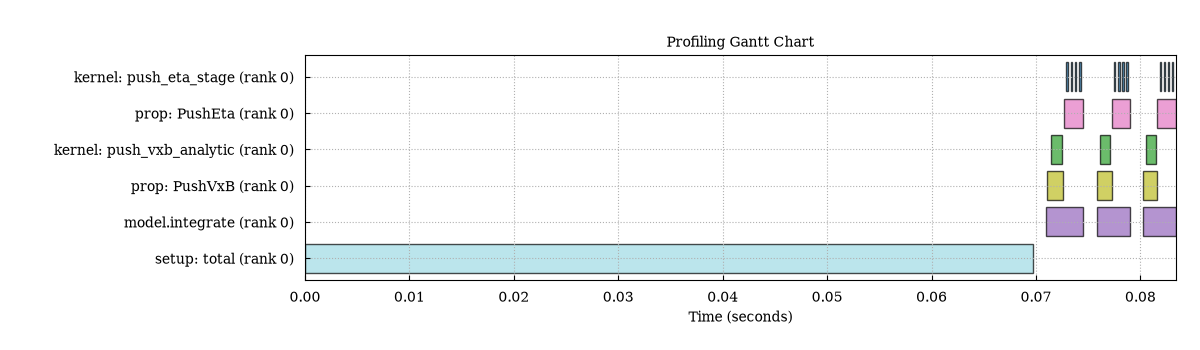
Gantt chart produced by scope-profiler plot all for the Vlasov
example, one lane per region.#
The flame graph instead answers where the time went: the call stack is
reconstructed from timestamp containment, so nested regions such as
kernel: push_vxb_analytic inside prop: PushVxB inside
model.integrate are drawn as stacked levels rather than separate lanes:
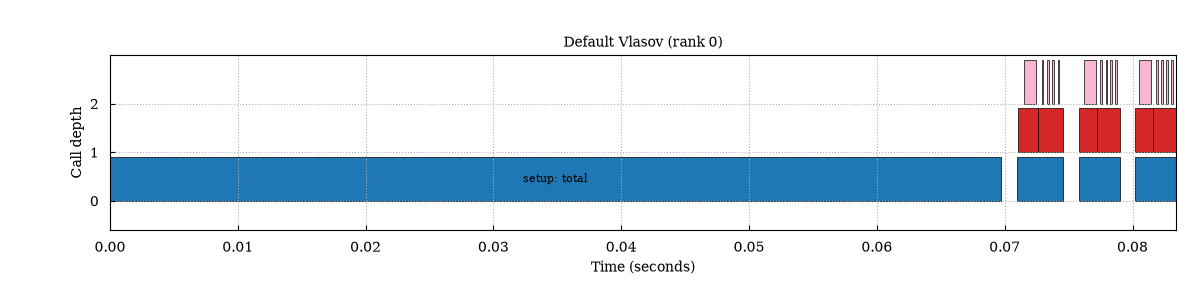
Flame graph for the same run, rank 0, showing nested profiling regions.#
Passing several profiling_data.h5 files (e.g. from runs at different MPI
rank counts) to scope-profiler plot speedup produces a per-region speedup
plot, and --x can compare runs along other metadata fields such as
omp_num_threads. Filtering regions with --include/--exclude,
selecting ranks with --ranks, switching to interactive HTML output with
--backend plotly, inspecting text summaries with scope-profiler
inspect, and exporting the underlying plot data or .prof / speedscope
files with scope-profiler export are all covered in the
postprocessing CLI guide.
This documentation page is not meant to duplicate that guide — see the link
for the full set of flags and examples.
For a quick text sanity check, run scope-profiler inspect
sim_1/profiling_data.h5 and compare the total runtime of the dominant regions
across ranks. A large imbalance between ranks usually means the expensive
section is load-dependent rather than purely algorithmic.
If use_line_profiler=True was set in ProfilingOptions, the
same HDF5 file also stores line-profiler timings. Inspect them with:
scope-profiler line-profile sim_1/profiling_data.h5
For interactive terminal exploration, use:
scope-profiler tui sim_1/profiling_data.h5